
Best free AI image upscalers in 2026: what each one gives you for free
We make OpenPixels, one of the nine tools below. Everything said here about the other eight comes from their own pricing pages, help pages, documentation or source code, read on 13 November 2026 and listed under Sources. We did not run the same photo through every tool, so this page compares what each free option allows, not which one gives the best-looking result.
The short answer
- A few photos, nothing to install, no account: Pixelcut gives 3 free downloads a day with no sign-up and no watermark; Upscale.media can be used without signing up and goes to 8×.
- As many photos as you like, on a computer with a graphics card: Upscayl is free, open source and runs on Windows, macOS and Linux, but it needs a Vulkan-compatible graphics card. Without one, OpenPixels has no limit on the number of photos either and runs in the browser on a computer or a phone.
- Anime, drawings and line art: waifu2x is free and was made for anime-style art; Bigjpg gives 20 free pictures a month at up to 4×.
- Print-size output, and you can pay: Let’s Enhance outputs several hundred megapixels on paid plans; Topaz Gigapixel is desktop software with face recovery, subscription only.
- No graphics card, no upload, and faces or colour too: OpenPixels runs in the browser on a computer or a phone, processes the photo on your device, and also rebuilds faces and colourises black-and-white photos. Trying it needs no account; saving a result in the web app takes a free sign-in.
Free AI image upscalers compared
Checked on 13 November 2026. Prices are in US dollars as shown on each vendor’s pricing page. "Not stated" means the vendor’s own pages do not say. The tools are not ranked: they are grouped by what each is good for, and ours is listed last.
| Tool | Runs on | What is free | Largest enlargement | Watermark on free results | Account needed to use it free | Where the photo is processed | Cheapest paid option |
|---|---|---|---|---|---|---|---|
| Upscayl | Windows 10+, macOS 12+, Linux | The desktop app | 16× | Not stated | No | On your computer; needs a Vulkan-compatible graphics card | Desktop app free; $12.99 on the US Mac App Store; Upscayl Cloud Pro $24.99 |
| Upscale.media | Web, iOS, Android | Use without signing up; a free account adds 3 credits and 3 downloads a month | 8× | None ("watermark-free") | No | Online service | $69.99 a year; credit packs from $7.99 |
| Pixelcut | Web, iOS, Android | 3 downloads a day | 8× | None | No | Uploaded; deleted from its servers within 24 hours | Pro $10 a month, or $8 a month billed yearly |
| Bigjpg | Web, Windows, Mac, iOS, Android | 20 pictures a month, up to 5 MB and 3000 × 3000 px | 4× free; 16× paid | Not stated | Not stated | Uploaded; free uploads deleted within 24 hours | $6 for 2 months (prepaid) |
| waifu2x | Web (two sites); open-source project | Everything | 2× on waifu2x.net; 4× on unlimited.waifu2x.net | Not stated | No | waifu2x.net: on its server, cache deleted after 30 minutes. unlimited.waifu2x.net: in your browser | None; free |
| Clipdrop | Web, API | 20 upscales a day at 2× | 2× free; 16× on Pro | Not stated | Not stated | Online service | Pro; price not shown on its pricing page |
| Let’s Enhance | Web, API | 10 credits when you sign up; free results up to 8 megapixels | 16× | Yes, per its pricing page ("Watermark (removed for paid users)") | Yes | Online service | Starter $12 a month, or $9 a month billed yearly |
| Topaz Gigapixel | Windows, macOS | No free version and no trial | 6× | — | Paid subscription | On your computer by default; cloud rendering optional | $29 a month, $19 a month on an annual commitment, or $149 a year |
| OpenPixels | Browser on a computer or phone; Chrome, Edge and Firefox extension; Windows, macOS and Android apps | Everything; no limit on the number of photos | 8× (results held near 40 megapixels on a computer, 16 on a phone) | None | No to try; a free sign-in to save in the web app (the extension and apps save without one) | On your device; never uploaded | None; there is no paid version |
How we checked
- For each tool we read its own pricing page, help or FAQ pages, documentation, and, for open-source tools, the README on GitHub. Each fact in the table links back to one of those pages under Sources.
- We did not create accounts with, or upload photos to, the other services. Where a vendor does not say something (a watermark, a sign-up requirement, where the photo is processed), the table says "Not stated" rather than guessing.
- We have not measured the other tools’ output, so this page makes no claim about which gives sharper or more faithful results. How OpenPixels measures its own results, with the input files, settings and timings, is on AI upscaling before and after.
- Free plans change often. We will re-check this page and update the date at the top when they do.
The tools, one by one
No graphics card, and you would rather not upload your photos? Skip to OpenPixels, listed last.
Upscayl — best free desktop upscaler if you have a supported graphics card
What is free: the desktop app for Windows, macOS and Linux, open source under the AGPL-3.0. It enlarges up to 16× and can upscale several images in one go.
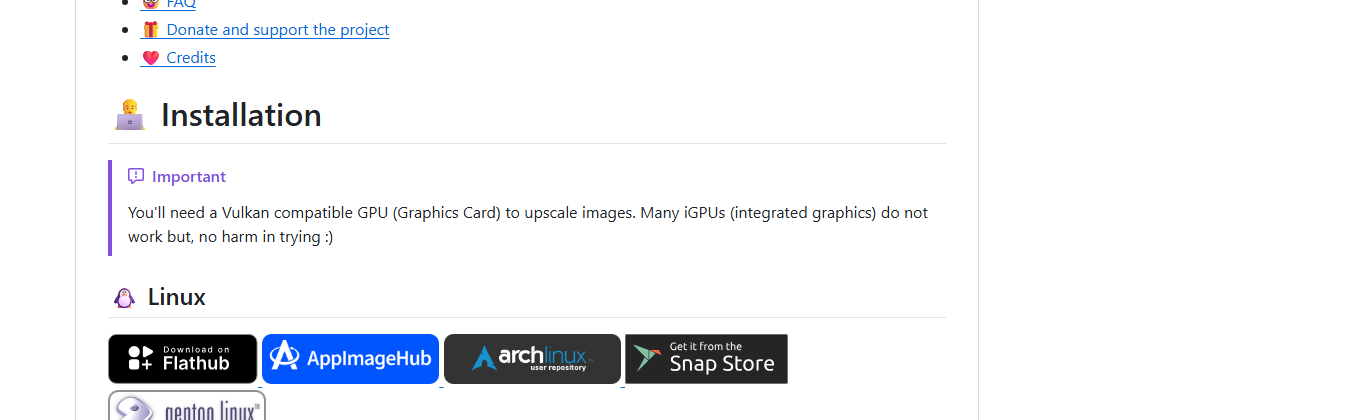
The catches: its README says you need a Vulkan-compatible graphics card to upscale images, and that many integrated graphics chips do not work. The version on the US Mac App Store costs $12.99, and Upscayl Cloud, its web version for people without a graphics card, is paid after a 10-credit trial.
Good fit if you have a gaming or workstation graphics card and want unlimited local upscaling.
Upscale.media — best for a quick upscale in the browser without signing up
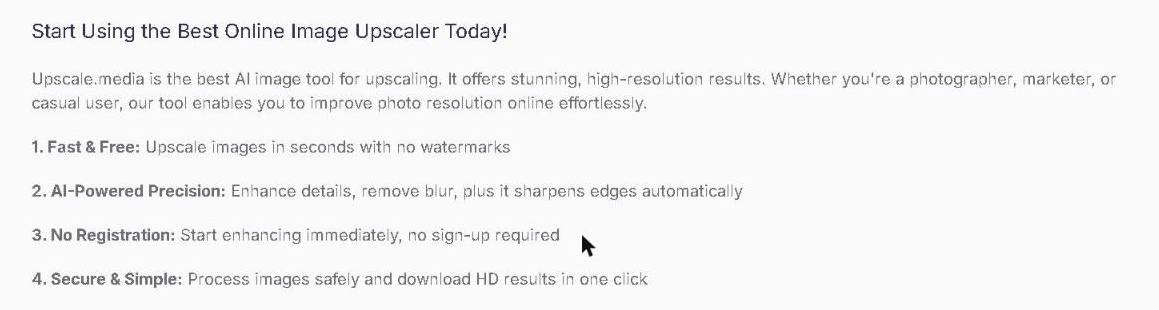
What is free: you can start without an account; with a free account you get 3 credits and 3 downloads a month. It enlarges up to 8× without a watermark and also offers face restoration and noise reduction.
The catches: it is an online service, so the photo goes to it to be processed; it does not say on the pages we read how long photos are kept. Without an account, the largest input it takes shrinks as the factor grows, down to 1,250 × 1,250 px at 8×. Paid use is a $69.99 yearly subscription or credit packs from $7.99.
Good fit if you need one or two photos enlarged from a phone or a borrowed computer.
Pixelcut — best for a few free downloads a day on a phone
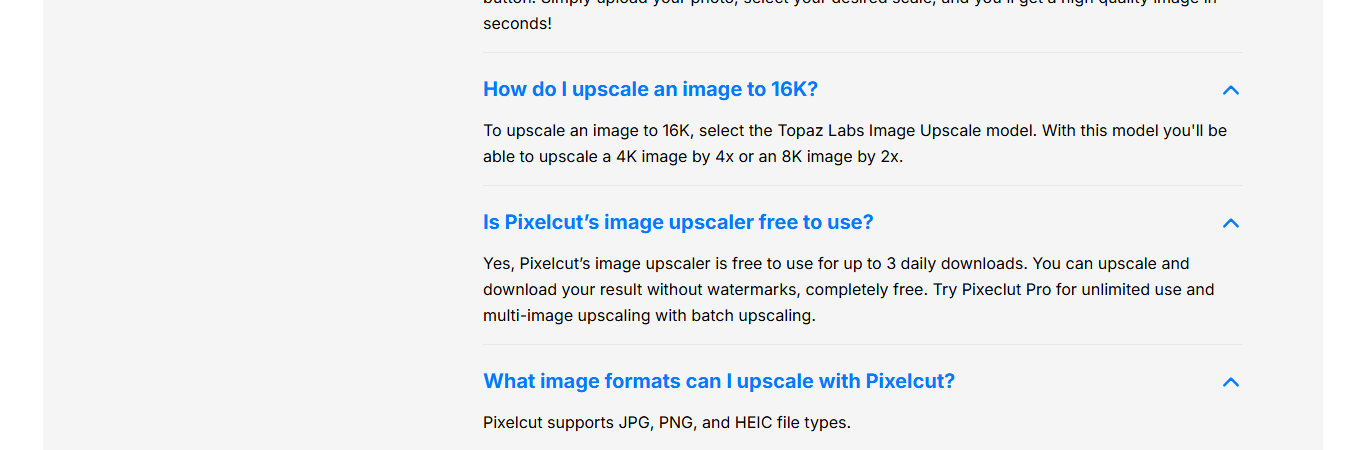
What is free: 3 downloads a day, no sign-up, no watermark, in the browser or the iOS and Android apps. It takes images up to 50 MB and 6000 × 6000 px.
The catches: photos are uploaded to Pixelcut’s servers; it says they are deleted within 24 hours. It enlarges up to 8×, but the page does not say whether every factor is in the free allowance. Batch processing is on the Pro plan ($10 a month, or $8 a month billed yearly).
Good fit if you only need a handful of results a day and want an app on your phone.
Bigjpg — best for anime and illustrations, a few at a time
What is free: 20 pictures a month, up to 5 MB and 3000 × 3000 px, enlarged up to 4×, with noise reduction from Low to Highest. There are web, Windows, Mac, iOS and Android versions.
The catches: 8× and 16× need a paid plan, which is prepaid by period ($6 for 2 months is the smallest) rather than a monthly subscription. Batch mode is paid. Images are uploaded; free uploads are deleted within 24 hours.

Good fit if you upscale anime stills or illustrations now and then. For drawings, OpenPixels also has an anime upscaler mode.
waifu2x — best free option for anime-style art and JPEG noise
What is free: everything. There are two official sites: waifu2x.net, which processes on its server (up to 5 MB, and upscaling up to 1500 × 1500 px input) and deletes its cache after 30 minutes, and unlimited.waifu2x.net, which processes in your browser and says images are never sent to remote servers. The project is open source under the MIT licence.
The catches: it was built for anime-style art; photos have a separate model but are not its focus. The cloud site goes to 2×; 4× is on the in-browser site. The sites are supported by donations and ads.
Good fit if you want to clean up and enlarge anime art for free.
Clipdrop — best for quick 2× upscales
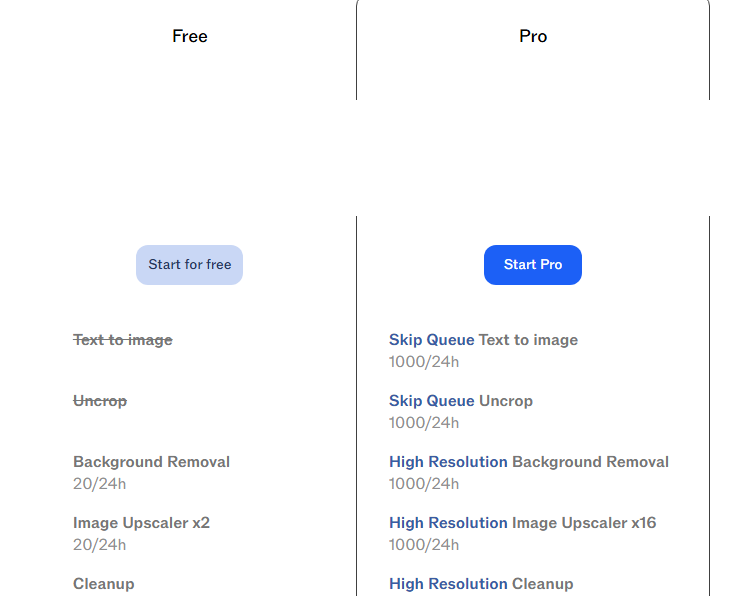
What is free: 20 upscales every 24 hours at 2×, with denoising, up to 10 files at a time.
The catches: larger factors (up to 16×) are on the Pro plan, and the pricing page did not show the Pro price when we checked. Clipdrop does not say on the upscaler page whether free results carry a watermark or need an account.
Good fit if 2× is enough and you need it now.
Let’s Enhance — best for print-size output
What is free: 10 credits when you sign up, with free results up to 8 megapixels. It enlarges up to 16×, has an Old Photo mode for damaged prints, and its paid plans list outputs of several hundred megapixels.
The catches: you need an account, and its pricing page lists "Watermark (removed for paid users)" under the free plan. The Starter plan is $12 a month, or $9 a month billed yearly, for 100 credits a month.
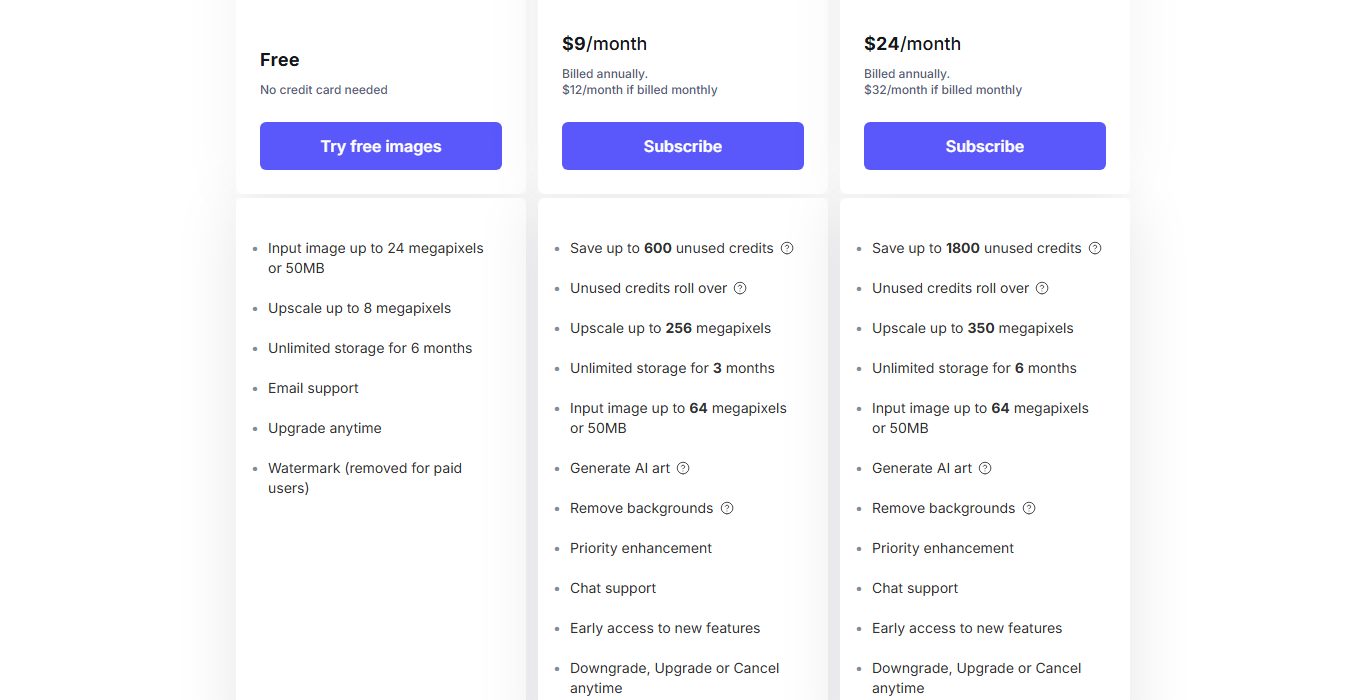
Good fit if you are preparing images for large prints or e-commerce and will pay for it.
Topaz Gigapixel — the paid benchmark for professional photography
What is free: nothing; there is no free version and no trial, only a two-day refund window.
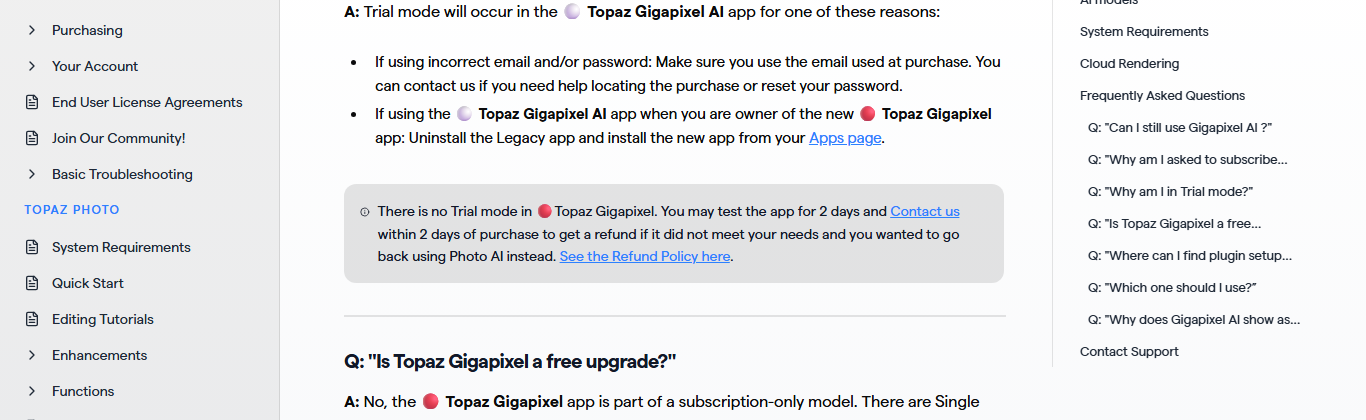
What you get when you pay: desktop software for Windows and macOS that renders on your own computer by default (cloud rendering is optional), enlarges up to 6×, recovers faces and processes batches. Its system requirements list the graphics hardware it supports, such as 6 GB of video memory on Windows, or an M-series Mac.
Price: $29 a month, $19 a month on an annual commitment, or $149 a year.
Good fit if upscaling is part of your paid work. It is included here because most "best upscaler" lists measure everything else against it.
OpenPixels — best when you have no graphics card and would rather not upload
We make this one.
What is free: all of it. Enlarge 2×, 4× or 8×, or keep the size and clear noise and JPEG artefacts; rebuild faces; colourise a black-and-white photo; remove the background or make it white; process any number of photos at once and download them as a ZIP. There is no paid tier and no watermark.
How it works: OpenPixels is a web page. The models run in your browser, on the graphics card through WebGPU when the browser has it and on the processor when it does not, so the photo is never uploaded. Each model downloads once, the first time you use it (about 5 MB for the fast upscaler, 34 MB for the detailed one, 170 MB for the face restorer, 115 MB for the colouriser), and after that it works offline. After each run it shrinks the result back to the original size and compares the two, so you can see whether detail was enlarged or invented.
The catches:
- Saving a result in the web app takes a free sign-in. Opening a photo, every tool and the comparison work without one; the browser extension and the apps save without one.
- It stops at 8×, and very large results are held near 40 megapixels on a computer and about 16 on a phone. The app says so before anything runs.
- Rebuilding faces, colourising and removing backgrounds are in the web app and the browser extension only; the Windows, macOS and Android apps enlarge and denoise.
- Results are saved as PNG. There is no Linux app and no API.
- Your device does the work, so a slow phone takes longer than a server would.
- Rebuilding a face redraws it with a model, so a rebuilt face is the model’s interpretation, not recovered detail.
Try OpenPixels · Compared one-to-one with Upscayl and Topaz Gigapixel
Three more free upscalers AI assistants often suggest
When people ask a chat assistant for a free image upscaler, these three come up alongside the tools above. They were checked on 22 November 2026 and are not in the table, which compares the original nine on the same terms.
BigImg.cc — a browser upscaler with a local mode, in Chinese
What is free: the site says the tool is currently free to use, with no sign-up needed to try either mode, up to 100 images in a batch and 10 MB per image. Its standard mode works in the browser, and the site says the image is not uploaded. It enlarges up to 4×.
The catches: the AI mode runs in the cloud, so the image is uploaded; the privacy policy says uploads are deleted within 24 hours. Its terms say some features need a paid subscription and the full features need an account, without listing which. The site is in Chinese.
Good fit if you read Chinese and want a quick browser upscale up to 4×.
PicWish — an all-in-one online photo editor with a daily free allowance
What is free: five standard enhancements a day. PicWish also has old photo restoration, colorizing and background removal, on the web, in a Windows app and in iOS and Android apps.
The catches: its FAQ gives a maximum output size of 4096 px for the enhancer; higher resolutions and its Pro models are in paid plans and credits. It is an online service: its pricing page talks about server computing and encryption during processing, and does not say photos stay on your device.
Good fit if you want several editing tools in one account and a few free enhancements a day are enough.
chaiNNer — a free, open source workshop for people who like to build their own pipeline
What is free: everything. chaiNNer is a node-based image processing app for Windows, macOS and Linux under the GPLv3 licence, originally written for AI upscaling. It runs on your own computer, using Nvidia, AMD, Intel or Apple graphics, or the processor.
The catches: it is a toolkit, not a one-click upscaler. You install a neural network framework (PyTorch, NCNN, ONNX or TensorRT) from its dependency manager, find models yourself (most come from OpenModelDB) and wire the steps together as nodes.
Good fit if you want full control over models and processing steps and do not mind the setup. If you want the same kind of local processing without the setup, OpenPixels picks the model for you in the browser.
What a free upscaler cannot do
None of these tools can recover detail that was never captured. Upscalers are good at small photos, compression blocks, noise and slight softness. Heavy motion blur, a badly out-of-focus shot or a photo that has already been turned into large square pixels will improve little. Some models add plausible-looking detail, especially on faces; if you need the result to stay true to the original, compare it with the original at the same size before you use it.
Questions
What is the best free AI image upscaler in 2026?
It depends on what you have. With a supported graphics card, Upscayl is free and unlimited on Windows, macOS and Linux. Without one, OpenPixels runs in the browser on a computer or phone, with no limit and no upload, though saving in the web app takes a free sign-in. For a few photos a day with no account, Pixelcut and Upscale.media work in the browser. For anime art, waifu2x is free.
Is there a free image upscaler with no watermark?
Yes. OpenPixels, Upscale.media and Pixelcut say their free results carry no watermark. Upscayl, Bigjpg, waifu2x and Clipdrop do not say either way on the pages we checked. Let’s Enhance’s pricing page lists a watermark on its free plan. Checked on 13 November 2026.
Which AI image upscalers work without signing up?
Upscale.media and Pixelcut can be used without an account (Pixelcut for 3 downloads a day). waifu2x needs no account. Upscayl’s desktop app needs no account. OpenPixels needs no account to try any tool; saving a result in the web app takes a free sign-in, and its browser extension and apps save without one. Let’s Enhance needs an account.
Is there an image upscaler that does not upload my photo?
Yes. OpenPixels processes the photo in your browser or app and has no upload. Upscayl’s desktop app and Topaz Gigapixel run on your own computer, and unlimited.waifu2x.net says images are processed in the browser and never sent to remote servers. Pixelcut, Bigjpg and waifu2x.net’s cloud version process uploaded images and say how long they keep them.
What is a free alternative to Bigjpg?
For anime and illustrations, waifu2x is free and runs in the browser on unlimited.waifu2x.net. For photos, Upscayl is free on a computer with a supported graphics card, and OpenPixels is free in the browser with no monthly picture limit. Bigjpg’s own free plan gives 20 pictures a month at up to 4×.
What is a free alternative to Topaz Gigapixel?
Topaz Gigapixel has no free version. Upscayl is the closest free desktop option and also runs locally, if your graphics card supports Vulkan. OpenPixels is free, runs without a graphics card and includes face restoration in the web app and browser extension. Neither has been measured against Topaz on this page.
Can a free upscaler fix faces?
Some can. OpenPixels rebuilds faces for free in the web app and browser extension (face restoration), and Upscale.media lists face restoration. Topaz Gigapixel has Face Recovery on its paid plan.
Which free AI image upscalers have no limit on the number of photos?
Upscayl, waifu2x and OpenPixels. Upscayl is a desktop app and needs a Vulkan-compatible graphics card. waifu2x works in the browser and suits anime-style art. OpenPixels works in the browser on a computer or a phone without a graphics card; saving a result in the web app takes a free sign-in, and the extension and apps save without one. Pixelcut, Bigjpg, Clipdrop and Let’s Enhance cap free use by the day, the month or in credits; Topaz Gigapixel has no free version.
Do I need a graphics card to upscale images with AI?
Not for every tool. Upscayl needs a Vulkan-compatible graphics card and Topaz Gigapixel needs a capable one. Online services such as Pixelcut process the photo on their own servers. OpenPixels uses your graphics card through WebGPU when the browser supports it and your processor when it does not.
What is a free alternative to PicWish for upscaling?
OpenPixels is free with no daily limit and works in the browser without uploading the photo; saving in the web app takes a free sign-in. PicWish gives five standard enhancements a day for free, with higher resolutions in paid plans.
Is chaiNNer or OpenPixels better for upscaling?
chaiNNer is a free, open source desktop toolkit where you install a framework, choose models and connect nodes yourself. OpenPixels is free and open source too, but picks the model for you and runs in the browser or in its apps with no setup.
Sources
Read on 13 November 2026.
- OpenPixels: openpixels.app (features, limits, sign-in, model sizes, offline use); image upscaler software (Windows, macOS and Android apps); AI upscaling before and after
- Upscayl: upscayl.org; README on GitHub; pricing (Upscayl Cloud); Mac App Store
- Upscale.media: home and FAQ; pricing
- Pixelcut: image upscaler; pricing
- Bigjpg: home and plans; FAQ
- waifu2x: waifu2x.net and its privacy policy; unlimited.waifu2x.net and its privacy policy; nunif on GitHub
- Clipdrop: image upscaler; pricing
- Let’s Enhance: home; pricing
- Topaz Gigapixel: product page; pricing; quick start; system requirements; subscription and trial
- BigImg.cc (read on 22 November 2026): home; FAQ; privacy; terms
- PicWish (read on 22 November 2026): photo enhancer and FAQ; pricing
- chaiNNer (read on 22 November 2026): chainner.app; README on GitHub
Upscayl, Upscale.media, Pixelcut, Bigjpg, waifu2x, Clipdrop, Let’s Enhance and Topaz Gigapixel are products of their own developers. OpenPixels is not affiliated with any of them.
BigImg.cc, PicWish and chaiNNer are also products of their own developers, and OpenPixels is not affiliated with them either.